
A website hangs a shingle in cyberspace. It ensures editors, PRs and fans searching for you encounter a polished, professional image, not your latest marathon time or unfortunate tequila-shot expression. No writer — especially one emerging into a new genre or upping their game — should be without an online portfolio 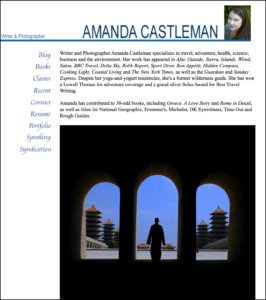 these days.
If you don’t have one, kick those excuses to the curb. You don’t need a designer. Or even a site-building service like Wix or Weebly, which may use generative AI to create and post content without your permission (!). They can also trap your content in an expensive, proprietary format that won’t export smoothly, should you change hosts. Set aside a few hours, open a Blogger or WordPress account, and have at it. You can always prettify and posh it up down the road: in the great tech tradition of companies like Microsoft and Amazon, “release early, release often.” Better a rudimentary website than no presence at all, which telegraphs that you’re not taking your writing seriously. And if you don’t, why should an editor or reader?
Essential Elements for a Writer Portfolio
- a brief biography explaining who you are, what you write and where it’s appeared. If you already have a long list of publications, consider hitting the highlights in your bio, then including a full list or resume elsewhere on your site. (No clips yet? Don’t panic! Just present yourself, your skills and maybe a few samples of your unpublished work. More on this below…)
- flaunt your expertise, which can open doors. It gives editors a reason to take a chance and pick you over contributors they know are solid (as in: smart, on-time, cooperative about edits, willing to fact check and turn in relatively “clean” copy that doesn’t require a ton of copyediting, etc.). Remember: your knowledge extends far beyond media skills and could include age, sports, hobbies, experiences, ethnicity, gender-identity, education, geographical location, previous staff roles, being candid about mental or physical health, any topic you’ve delved into and so on. Use anything that gives you an edge, so long as you don’t feel too exposed!
- an author photo or at least an avatar or logo. This doesn’t have to be an artsy, hand-on-chin,
black-and-white pro-shot. Just not that tequila face… unless you cover spirits or frat parties. - links to any online publications (always screenshot or “save as” to archive copies offline, just in case the material expires or the sites tank. I often “print to PDF” as well, since this can keep things tidier-looking) or use free PDF generators. If you’ve lost track of some clips, try the Wayback Machine, a free service that archives websites.
- the text of any unpublished works or print clips you want to showcase. Most publications permit authors to republish works for self-promotional purposes (if in doubt, ask. This won’t be strange: editors field such inquiries all the time and only the meanest or most corporate would refuse you). Scans — JPGs and PDFs — aren’t ideal: they can annoy editors and also prevent search engines from examining and indexing your work, making it harder for folks to find you. So get typing, if you didn’t retain an electronic copy for key works. Yes, it sucks, I know. But also it’s over more quickly than you’d expect…
- an email address. NEVER a form: they foul up enough that most editors won’t bother using them. Be accessible and leave the heavy lift to your spam filters, mail client’s rules and apps like Unroll.me. (Still worried? You can always create another email account to be public-facing, then autoforward non-spam messages to your main address.)
Add Flourishes For a More Polished Professional Site
- a blog
- resume
- bibliography
- endorsements
- photo galleries
- YouTube channel
- speaking engagements and other events
- feeds from social media sites like Instagram or TikTok
- social media “chiclets” (buttons that live-link to your other accounts)
Building A Writer Portfolio: Five Steps, Two Ways
But for now, the goal is a simple beach-head online. The following five steps will cobble together an online portfolio using free blogging platforms.
1. Create a static page and make this the first thing people see. Blogs publish in reverse chronological order — placing the newest material at the top. That’s not ideal for an online portfolio, so tweak it so folks see your bio
or an overview first (WordPress tips, Blogger advice).
2. People are visual creatures, so post your photo, avatar or logo on there. (WordPress tips, Blogger advice).
3. Show off your stuff. Make a list of content, ideally featuring headlines, place and date of
publications (if relevant) and a few lines to ignite interest. Experienced authors may want to group material by topic. Include links to work online (WordPress tips, Blogger advice).
4. Create more static pages, allowing you to post content not already online. (WordPress tips, Blogger advice).
5. Advanced wizardry: set up a custom domain like www.yourname.com, instead of http://yourname.blogspot.com. It costs less than $20 per year and takes minutes (WordPress tips, Blogger advice).
That’s it. Five simple steps to a writer’s website. Now get cracking if you haven’t already!
Seriously.
Should you spring for a custom URL?
Web sites aren’t an expensive tool. A domain name — the www.xxx.com bit — averages $7–15 a year (promotional rates can drop to pennies on sites like GoDaddy even, though NameCheap remains my favorite for its responsiveness and lack of upselling. Also, it won’t hold your domain name hostage if you don’t renew in time).
You also need a home for your files on a server. Blogger and WordPress.org (not the paid WordPress.com service) offer these for free. Other hosts can range from a few bucks a month to elaborate packages with built-in forms, SEO-advice, sales platforms, etc. I’ve used Dreamhost for years, which allows me to create multiple sites for $157 each year.
A lot of journalists have been relying on Contently, MuckRack and other free portfolio services lately. While a toehold there is better than nothing, you’re advertising the content-middle-man company and boosting its web juju with every link. A bespoke domain— and Blogger/Wordpress site — conveys much more authority.
But, again, any portfolio is better than no portfolio! Do what you can, when you can.
Do you need a splashy image-rich format?
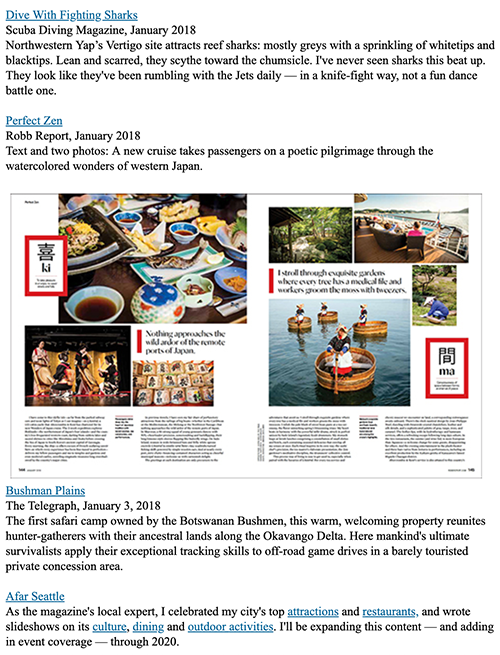
Short answer: nope! Image grids are a terrific way to showcase Instagram snaps, but not the most information-rich format for editors scanning your clips. Most bosses want to see three clips relevant to the project at hand, which savvy freelancers include in their pitches, along with their portfolio URLs or a link to subject-matter landing pages. These allow you to showcase your expertise in more depth, while introducing key terms to your main navigation bar (WordPress tips, Blogger advice).
I like to include a live-linked title, the outlet name, publication date and the lede or a favorite snippet from the piece. This gives editors — and search bots — a sense of your work far more than leading with an image (often someone else’s creative effort). Of course, you can still take screenshots of your work and decorate your page with them. But even as a writer/photographer, I like to lead with words first, not art! (I have a separate PhotoShelter site for my images, which also generates a slideshow for my writer portfolio.
Not ready to dive into a build? We offer a portfolio package that includes design, development, editing and coaching, so you can maintain and update your site with confidence.